通过消息启动批处理作业
当使用核心 Spring Batch API 启动批处理作业时,您基本上有两个选项:
-
从命令行,使用
CommandLineJobOperator -
以编程方式,使用
JobOperator.start()
例如,在使用 shell 脚本调用批处理作业时,您可能希望使用
CommandLineJobOperator。或者,您也可以直接使用
JobOperator(例如,当将 Spring Batch 作为 Web 应用程序的一部分使用时)。然而,对于更复杂的使用场景该怎么办呢?也许您需要轮询远程 (S)FTP 服务器以获取批处理作业所需的数据,或者您的应用程序必须同时支持多种不同的数据源。例如,您接收的数据文件可能不仅来自 Web,还来自 FTP 和其他来源。在调用 Spring Batch 之前,可能还需要对输入文件进行额外的转换。
因此,使用 Spring Integration 及其众多适配器来执行批处理作业将更为强大。例如,您可以使用文件入站通道适配器来监控文件系统中的某个目录,并在输入文件到达时立即启动批处理作业。此外,您还可以创建 Spring Integration 流程,利用多种不同的适配器,仅通过配置即可轻松地从多个来源同时为您的批处理作业摄入数据。使用 Spring Integration 实现所有这些场景非常简单,因为它支持对JobOperator进行解耦的、事件驱动的执行。
Spring Batch Integration 提供了
JobLaunchingMessageHandler 类,您可以使用它来启动批处理作业。
JobLaunchingMessageHandler 的输入由 Spring Integration 消息提供,该消息的有效负载类型为
JobLaunchRequest。此类是对要启动的 Job 以及启动批处理作业所需的 JobParameters 的包装器。
下图展示了启动批量作业所需的典型 Spring Integration 消息流。 EIP(企业集成模式)网站 提供了消息图标的完整概述及其描述。
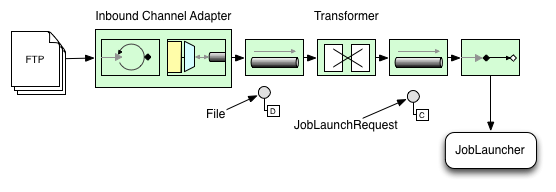
将文件转换为 JobLaunchRequest
以下示例将文件转换为 JobLaunchRequest:
import org.springframework.batch.core.Job;
import org.springframework.batch.core.JobParametersBuilder;
import org.springframework.batch.integration.launch.JobLaunchRequest;
import org.springframework.integration.annotation.Transformer;
import org.springframework.messaging.Message;

import java.io.File;

public class FileMessageToJobRequest {
    private Job job;
    private String fileParameterName;

    public void setFileParameterName(String fileParameterName) {
        this.fileParameterName = fileParameterName;
    }

    public void setJob(Job job) {
        this.job = job;
    }

    @Transformer
    public JobLaunchRequest toRequest(Message<File> message) {
        JobParametersBuilder jobParametersBuilder =
            new JobParametersBuilder();

        jobParametersBuilder.addString(fileParameterName,
            message.getPayload().getAbsolutePath());

        return new JobLaunchRequest(job, jobParametersBuilder.toJobParameters());
    }
}
作业执行响应
当批处理作业正在执行时,将返回一个JobExecution实例。您可以使用此实例来确定执行状态。如果JobExecution能够成功创建,则无论实际执行是否成功,它总是会被返回。
JobExecution 实例的确切返回行为取决于所提供的 TaskExecutor。如果使用的是(单线程)synchronous TaskExecutor 实现,则仅在作业完成after才会返回JobExecution响应。当使用asynchronous TaskExecutor时,JobExecution实例会立即返回。随后,您可以获取JobExecution实例的id(通过JobExecution.getJobInstanceId()),并使用JobExplorer查询JobRepository以获取作业的最新状态。更多信息请参阅 查询存储库。
Spring Batch 集成配置
考虑这样一种情况:某人需要创建一个文件 inbound-channel-adapter 来监听指定目录中的 CSV 文件,将它们传递给转换器(FileMessageToJobRequest),通过作业启动网关启动作业,并使用 logging-channel-adapter 记录 JobExecution 的输出。
-
Java
-
XML
以下示例展示了如何在 Java 中配置这种常见情况:
@Bean
public FileMessageToJobRequest fileMessageToJobRequest() {
    FileMessageToJobRequest fileMessageToJobRequest = new FileMessageToJobRequest();
    fileMessageToJobRequest.setFileParameterName("input.file.name");
    fileMessageToJobRequest.setJob(personJob());
    return fileMessageToJobRequest;
}

@Bean
public JobLaunchingGateway jobLaunchingGateway() {
    TaskExecutorJobLauncher jobLauncher = new TaskExecutorJobLauncher();
    jobLauncher.setJobRepository(jobRepository);
    jobLauncher.setTaskExecutor(new SyncTaskExecutor());
    JobLaunchingGateway jobLaunchingGateway = new JobLaunchingGateway(jobLauncher);

    return jobLaunchingGateway;
}

@Bean
public IntegrationFlow integrationFlow(JobLaunchingGateway jobLaunchingGateway) {
    return IntegrationFlow.from(Files.inboundAdapter(new File("/tmp/myfiles")).
                    filter(new SimplePatternFileListFilter("*.csv")),
            c -> c.poller(Pollers.fixedRate(1000).maxMessagesPerPoll(1))).
            transform(fileMessageToJobRequest()).
            handle(jobLaunchingGateway).
            log(LoggingHandler.Level.WARN, "headers.id + ': ' + payload").
            get();
}
以下示例展示了如何在 XML 中配置这种常见情况:
<int:channel id="inboundFileChannel"/>
<int:channel id="outboundJobRequestChannel"/>
<int:channel id="jobLaunchReplyChannel"/>

<int-file:inbound-channel-adapter id="filePoller"
    channel="inboundFileChannel"
    directory="file:/tmp/myfiles/"
    filename-pattern="*.csv">
  <int:poller fixed-rate="1000"/>
</int-file:inbound-channel-adapter>

<int:transformer input-channel="inboundFileChannel"
    output-channel="outboundJobRequestChannel">
  <bean class="io.spring.sbi.FileMessageToJobRequest">
    <property name="job" ref="personJob"/>
    <property name="fileParameterName" value="input.file.name"/>
  </bean>
</int:transformer>

<batch-int:job-launching-gateway request-channel="outboundJobRequestChannel"
    reply-channel="jobLaunchReplyChannel"/>

<int:logging-channel-adapter channel="jobLaunchReplyChannel"/>
示例 ItemReader 配置
现在我们已经轮询文件并启动了作业,接下来需要配置我们的 Spring
Batch ItemReader(例如),使其使用在名为"input.file.name"的作业参数所定义的位置找到的文件,如下面的 Bean 配置所示:
-
Java
-
XML
以下 Java 示例展示了必要的 Bean 配置:
@Bean
@StepScope
public ItemReader sampleReader(@Value("#{jobParameters[input.file.name]}") String resource) {
...
    FlatFileItemReader flatFileItemReader = new FlatFileItemReader();
    flatFileItemReader.setResource(new FileSystemResource(resource));
...
    return flatFileItemReader;
}
以下 XML 示例展示了必要的 bean 配置:
<bean id="itemReader" class="org.springframework.batch.infrastructure.item.file.FlatFileItemReader"
    scope="step">
  <property name="resource" value="file://#{jobParameters['input.file.name']}"/>
    ...
</bean>
前述示例中的主要关注点是将值
#{jobParameters['input.file.name']}
注入为 Resource 属性的值,并将 ItemReader bean 设置为步骤作用域(step scope)。将 bean 设置为步骤作用域可利用延迟绑定支持,从而允许访问
jobParameters 变量。